
Competitor Tracking MCP: What Your AI Agent Cannot See
An AI agent reads a competitor's site as it looks today. meertrack's MCP server gives it the dated record of what changed, across 15+ data types.

Ask any AI agent what your competitors changed last month and it answers from whatever their pages say today. It cannot see what came down, what got reworded, or what a price was last week. meertrack records those changes hourly across 15 data types and hands them to your agent through an open MCP server, so answers arrive with dates and sources attached.
Ask Claude, Cursor, or ChatGPT what a competitor did last month and any of them will handle it well enough. Each one reads that competitor's careers page, pricing page, and blog, then hands back a confident summary of what sits there right now.
That summary will be current and it will be thin, because a competitor's website is a snapshot that overwrites itself. When a price goes up, the old number is gone. When a job listing comes down, the page stops mentioning it and says nothing about why. The live site keeps no record that either thing happened, so an agent reading it today can describe the present and can only infer the sequence that produced it.
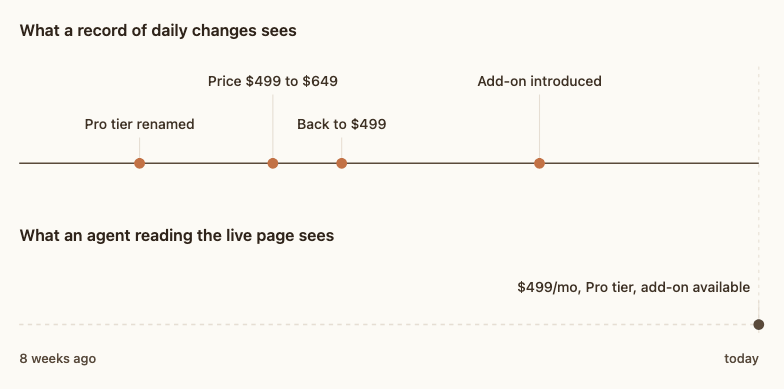
That sequence is a separate dataset, and you have it only if something was watching every hour of the day. meertrack does that watching across 15 data types per competitor, from pricing tables and homepage copy to job listings, case studies, and review activity, then exposes the result to any AI agent through an open-source MCP server with eight read-only tools.
Below are seven questions that dataset answers well, each set in a different kind of team.
What counts as a tracked change
A tracked change is a dated row recording what a page used to say and what it says now. Each one carries the competitor, which of the 15+ data types it belongs to, whether the item was added, updated, or removed, the date it changed, and a link to the source.
For anything with structure, meertrack computes the difference at the moment it detects it and stores the result in plain English. A pricing move arrives as a sentence along the lines of "Premium platform fee increased from $499 to $649 per month", so your agent reads a finished comparison and never has to diff two pages of HTML itself.
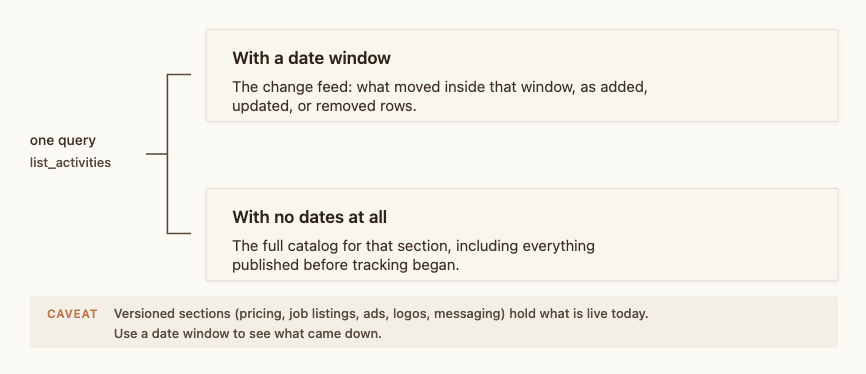
The dataset has two modes worth knowing before you write a single prompt. Ask for a date window and you get the change feed, meaning what moved inside it. Ask with no dates at all and you get the full catalog for that section, including everything published before tracking began. Some sections get versioned in place, including pricing, job listings, ads, logos, and messaging, so their catalog holds what is live today. Reach for a date window when you want what came down.
Some removals are just housekeeping
A removal in the feed does not always mean a decision. Job boards and content systems republish items constantly, so the same role can disappear and reappear because a location field was corrected, a URL changed, or a listing was cloned across offices and the duplicate was cleaned up. Take those rows at face value and you will report that a company abandoned a market when it fixed a typo.
An agent holding the additions and the removals from the same window can pair them up and discard the ones that cancel out. A tool that only pushes headlines cannot. This is why several of the prompts below ask for both sides of the ledger.
1. What actually changed this week?
Most of what a tracker detects is noise, and the instruction that makes an agent useful is permission to throw nearly all of it away.
Picture a 20-person B2B SaaS that schedules field technicians. One marketing hire covers positioning, content, and whatever competitive work fits around them. Four competitors, and checking all four by hand costs a morning that usually surfaces nothing worth acting on.
An agent with access to the change feed does that triage in one pass and comes back with four or five lines, each carrying a date and a source URL. The instruction that matters is the last one:
Pull everything from the last 7 days. Drop duplicates and anything that looks
like site housekeeping. Rank what remains by how much it would change a sales
conversation. Give me the top five with dates and links. If nothing clears the
bar, say so and stop.
An agent that always finds five things stops being read.
2. Did they move their pricing?
Pricing pages change rarely, and when they do the change outweighs almost anything else on the site.
Picture a product marketer at a B2B SaaS selling accounts-payable automation to mid-market finance teams. Sales messages them mid-deal: the competitor is quoting a number lower than the one on the battlecard, and the buyer wants an answer this afternoon.
The live pricing page cannot settle that. If a competitor ran a discount for a day and put the old number back, or moved a platform fee and reverted it a week later, the page shows only where things landed. A tracked row holds both moves with the dates attached, which turns a disagreement into a fact.
List pricing changes across all competitors for the last 90 days. Quote the
exact change and give me the date. Then pull the full pricing table for
anything where a headline number moved.
The follow-up call returns the whole tier structure for any row worth opening, so you get the shape of their packaging alongside the number that moved.
3. What did they quietly take down?
Removals are the decisions nobody announces.
Picture a product manager at a devtools company trying to work out where a competitor is putting its money. Job listings are the cheapest roadmap signal available, and the ones that disappear carry as much information as the ones that appear.
Three readings cover most cases. A senior role that vanishes with no replacement was probably filled, and you can often work out who filled it. A whole function that vanishes at once was a plan that lost its budget. A role that comes down and goes back up repeatedly is a requisition that keeps failing to close, which says something about their hiring market that a careers page never will.
Ask for both sides so the housekeeping rows filter themselves out:
Show me every job listing removed in the last 30 days, grouped by competitor.
Flag whether an equivalent role was added within 14 days.
4. What are they saying on their homepage today?
Homepage copy moves faster than anything else a competitor publishes.
Picture a strategist at a marketing agency holding competitive sets for six clients at once. That is eighteen or twenty homepages whose wording matters to somebody, and no one is re-reading them by hand.
Two things fall out of tracking that copy. The first is drift: positioning changes a sentence at a time, and a claim you built a client's counter-messaging around can stop being true without any announcement. The second is testing. A line that appears, disappears, and comes back inside a few days is a live experiment, and knowing a competitor is still arguing internally about how to describe itself is useful before you treat its messaging as settled.
Launch language is the simple case. Catching the exact sentence a competitor uses on the day a feature ships gives you their claim in their words, which is better raw material for a response than a paraphrase written a fortnight later.
Show me every messaging change from the last 14 days. Quote the exact text
added and removed, with dates. Flag any line that was added, removed, and
added again inside the window.
5. Can it cover every competitor at once?
Coverage is where a single chat window falls over.
Picture an analyst at an investment firm maintaining a market map of thirty companies in one category. Nobody opens thirty websites a week, and an agent asked to read all thirty in sequence burns through its context and produces mush somewhere around the twentieth.
The fix is structural. One subagent per company, each returning at most three bullets, each bullet carrying a date and a source, and anything unsourced dropped before it reaches the summary. The parent merges and ranks across the whole map. What arrives is a page you can read in two minutes, including the companies at the bottom of the map that rarely get opened.
Take one competitor per subagent and run five subagents in parallel. Three bullets each,
covering the last 14 days, every bullet with a date and a source URL. Drop
anything you cannot source. Then merge and rank across all of them.
The output contract is the part that matters. An agent given room to editorialize will, and "this company appears to be doubling down on enterprise" is the kind of sentence a real data source is supposed to prevent.
6. Is our battlecard still true?
Battlecards rot quietly, and teams usually find out when a rep repeats a stale line on a call.
Picture a sales lead at a 30-person HR and payroll SaaS with an enablement session on Thursday and a battlecard last touched in the spring. Somewhere in that document are claims about a competitor's pricing, positioning, and gaps that may have moved since.
The check runs without handing the document over. Ask for every change since the battlecard was last touched that lands on the kind of claim a battlecard makes, then hold the list against your own copy.
List every change from these competitors since 1 March that touches
pricing, positioning, product claims, or target market. Group by
competitor, quote the change, and give me the date and a source link.
Order each group by how much it would alter a battlecard claim.
What comes back is short enough to read beside the document, with a date and a source on every line. Teams willing to let the agent read the file can point it at the battlecard and have the stale lines named directly; the section on unattended runs covers keeping that current.
7. Which of our open deals are they already in?
Most published case studies name the customer, and the full list runs longer than the handful of logos on a homepage.
This is where the second mode earns its keep. Ask with no date filters and you get every case study a competitor has ever published, including the ones that went up years before you started tracking them.
Picture a revenue lead at an e-commerce operations SaaS with forty open opportunities. Some of those accounts appear on a competitor's customer page, which means the buyer has already been someone else's reference and the conversation you had planned is the wrong one.
Pull every case study for this competitor, all time. Extract the customer name
from each. Cross-reference against our open opportunities and tell me which
ones appear in their published customer list.
Point the agent at a CRM connection or a CSV export of your pipeline and it does the matching itself.
When you want this running unattended
Every question above works typed into a chat window, and several are worth automating once they earn their keep.
Claude Code runs headless, which means a scheduled job can ask the same question every weekday morning, write the answer to a dated file, and post it to Slack through a second connector. Teams that would rather not depend on a laptop can run the same prompt on a schedule through Claude Code's GitHub Action. Large rosters benefit from the parallel approach in question five, with a concurrency limit so the job stays inside the 60 requests per minute an API key allows. Maintained artifacts like battlecards work best with a written contract telling the agent to cite a date and source for every claim and to leave untouched sections alone, so the weekly diff stays readable.
The configurations for all of that live in the README, which we keep current as the MCP clients change their config formats. None of it is required to get value on day one.
Related reading
- meertrack now speaks MCP covers the connection itself: paste one URL into Claude, Cursor, ChatGPT, or your IDE, or run the local server with an API key.
- Why your CI tool should not tell you what to do is the argument underneath all of this.