
How Do I Get Real-time Alerts When Competitors Change Their Messaging?
Real-time alerts on competitor messaging changes come down to three honest paths: a DIY script, a hosted detector, or an AI-filtered CI tool. Compared.

Contents
- The short answer
- What counts as a messaging change (and what's just noise)
- Path 1: A scoped DIY script (and the five things that still break it)
- Path 2: A hosted change detector
- The hidden cost nobody prices in: alert fatigue
- Path 3: An AI-filtered competitive intelligence tool (what Meertrack does)
- Which path you should pick
- FAQ
- Try it on your stack
- Reference: the DIY script
The short answer
Use a website change-detection tool to monitor competitor homepages, pricing pages, and comparison pages on a fifteen-minute to hourly cadence, with alerts routed to Slack or email. Scope the monitor to four elements (page title, meta description, h1, h2) so cookie banners and visual refreshes don't fire alerts.
Hosted detectors will check as fast as every two minutes if you pay for the higher tiers. That cadence is available, but messaging changes don't demand it. A category-noun swap, a hero rewrite, or a sub-hero positioning shift takes a marketing team weeks to land in production, so fifteen-minute to hourly catches them the day they go live, hours before anyone on your team would have noticed.
The real question is signal quality, not latency. Three honest paths get you there:
- Write a script and own the maintenance.
- Use a hosted change detector and accept the noise that comes with it.
- Use an AI-filtered competitive intelligence tool that classifies changes before the alert reaches Slack.
The right path depends on how many competitors you track and how much attention your team can spare for triage.
What counts as a messaging change (and what's just noise)
A messaging change is anything that alters what a competitor claims to be, who they say they're for, or how they describe what they sell. Everything else is design noise.
Notion is the canonical example. The current homepage hero leads with "The AI workspace," a noticeable departure from the long-standing "all-in-one workspace" framing it carried through 2022. Wayback Machine snapshots track the shift alongside Notion AI moving from private alpha in November 2022 to general availability in February 2023. That's a category-noun shift. It tells you the product narrative has rotated. A team paying attention three weeks early gets a head start on positioning their own response.
Vercel did something similar over a longer arc. "Develop. Preview. Ship." was the frame through early 2023. "Frontend Cloud" arrived at Vercel Ship in May 2023. "AI Cloud" replaced it at Vercel Ship in July 2025. Each shift trailed a strategic bet by about a quarter, signposting the company's next category move months before the press release.
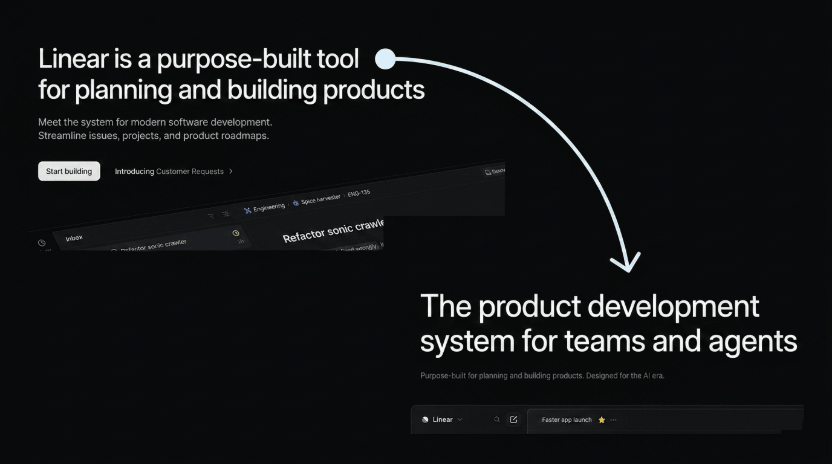
Linear moved from "issue tracking" to "the system for product development," a small word change and a large positioning move. Linear's own "Issue tracking is dead" page lands the point. Reading the homepage tells you the company decided to compete in a different category.
Compare any of those to Salesforce's June 2024 "Cosmos" refresh. The site got a new visual system, a new component library, a fresh logo execution, new hero photography. Almost no copy moved meaningfully. The screenshot diff was enormous, but the positioning was identical. A tool that fires an alert on the Cosmos refresh wastes your attention. A tool that ignores it is doing the job.
The rule we use, and the rule a classifier should encode:
- Signal: hero copy rewrite, category-noun shift, sub-hero positioning, pricing-page narrative, comparison-page framing, feature-page renaming, footer "made for" labels.
- Noise: copyright year, cookie banner copy, testimonial logo swap, hero photo swap, font and color refresh, layout reflow, build-ID strings in URLs, A/B test variant rotation.
The DIY and hosted-detector paths we look at next cannot tell the difference. They alert on the diff. That works for one or two competitors. It breaks down once you're tracking five.
Path 1: A scoped DIY script (and the five things that still break it)
The smallest honest approach is a scoped script that watches the page title, meta description, h1, and h2 elements on each competitor URL. About twenty lines of Python. Fetch the page, parse the HTML, pull those four elements, hash them, and post a Slack message when the hash changes. Drop it into a cron job and it works. A working reference implementation is at the end of this post.
Why those four elements: they are where messaging actually lives. The title tag is the meta-positioning line. The meta description is the elevator pitch the search engine sees. The h1 is the hero promise. The h2s are the supporting beats. Watching anything else (body text, footer, sidebars, hero photography) gives a stream of design noise without much signal in return.
Most of the failures that haunt generic full-page change detection do not apply here. Cookie banner churn is irrelevant; the banner is rarely an h1. Build IDs and CSRF tokens live in script blocks the script ignores. The narrow scope holds up where hashing the whole page falls apart.
It has its own list of failure modes, smaller and meaner:
- A/B test variant rotation in the hero. Marketing teams A/B test h1 copy regularly. Monday's h1 is "Ship faster"; Tuesday's is "Built for product teams"; Wednesday's is back to the control. Without session pinning, the script fires three alerts for one underlying test. The diff cannot tell you whether the rotation is a temporary experiment or whether the team has shipped a new permanent hero.
- JavaScript-rendered headings. A real share of competitors render their hero copy on the client. The raw HTML response returns placeholder skeleton text or an empty container, and the parser returns nothing useful. The fix is a headless browser like Playwright, which roughly triples runtime and brings its own flakiness.
- Non-semantic headings. A surprising share of marketing pages style a
<div>to look like a heading rather than using<h1>or<h2>at all. The script reports "no change" forever while the hero copy quietly rotates underneath. The failure is silent and asymmetric: a missed messaging shift is more expensive than a noisy alert. Fixing it means hand-tuning CSS selectors per competitor, and the selectors decay every time the competitor reorganizes their HTML. - Multiple h1s and h2 reordering. Modern marketing pages sometimes ship more than one h1, and the list of h2s gets reshuffled for SEO reasons without any messaging shift. The script fires on the list diff even though nothing meaningful moved. Diffing as a set fixes the false positives but loses cases where the same words appear in a different position on purpose, which is sometimes the messaging change itself.
- Geo and persona personalization. A competitor's homepage may show a different hero to US visitors than to European ones, or a different h2 stack to logged-in versus anonymous traffic. The script sees whichever variant the server gets. Residential proxies fix it for $30 to $300 a month per geo, plus the question of whether you want a proxy line item on the bill.
The honest verdict on path one: a scoped script that watches title, description, h1, and h2 is the most defensible DIY approach we have seen for messaging tracking specifically. For one or two competitors it is genuinely enough. The cost is not the engineering, which is small. The cost is reading every alert and deciding what it means.
That is the failure that does not go away no matter how clean the script gets. The diff tells you the h1 changed from "Ship faster" to "Built for AI workflows." The diff cannot tell you whether that is a permanent positioning move, a one-day campaign overlay, a regional variant, or an A/B test in flight. You can read each competitor's homepage personally and figure it out for the cost of an hour or so, and you can do that for one or two competitors. Above that, the cost of interpretation scales linearly while the value of any single alert stays flat.
That may be the path you are on right now. It is also the path that makes the next two options easier to evaluate, because you now know exactly what they save you from.
Path 2: A hosted change detector
A hosted change detector solves the setup and uptime problem and does almost nothing for the noise problem.
These are general-purpose tools that watch URLs and tell you when the page changed, often with a screenshot diff and a text diff alongside. The options worth knowing about:
- ChangeDetection.io. Open source. Self-host on a cheap VPS, or use the hosted plan. Excellent at the core job. No classification, no filtering by signal type.
- Visualping. Aimed at individuals and small teams. Screenshot diffing, with AI-generated change summaries on higher tiers. Hourly cadence on the free plan; minute-level on paid tiers.
- Distill.io. XPath, CSS, and regex selectors. Power-user tool, browser extension first.
- Wachete. Handles authenticated pages, which most of the others do not.
- Hexowatch. Broadest feature set in the group, with monitor types covering visual changes, content edits, HTML source, technology stack, and a handful more.
What they share: they fire when the page changes. That includes the cookie banner ticking over and the testimonial logo rotating in. None of them know what messaging is, and none of them group similar changes across competitors so you can see the pattern. The screenshot diff is usually the most useful part: human eyes scan a red box faster than any summary text.
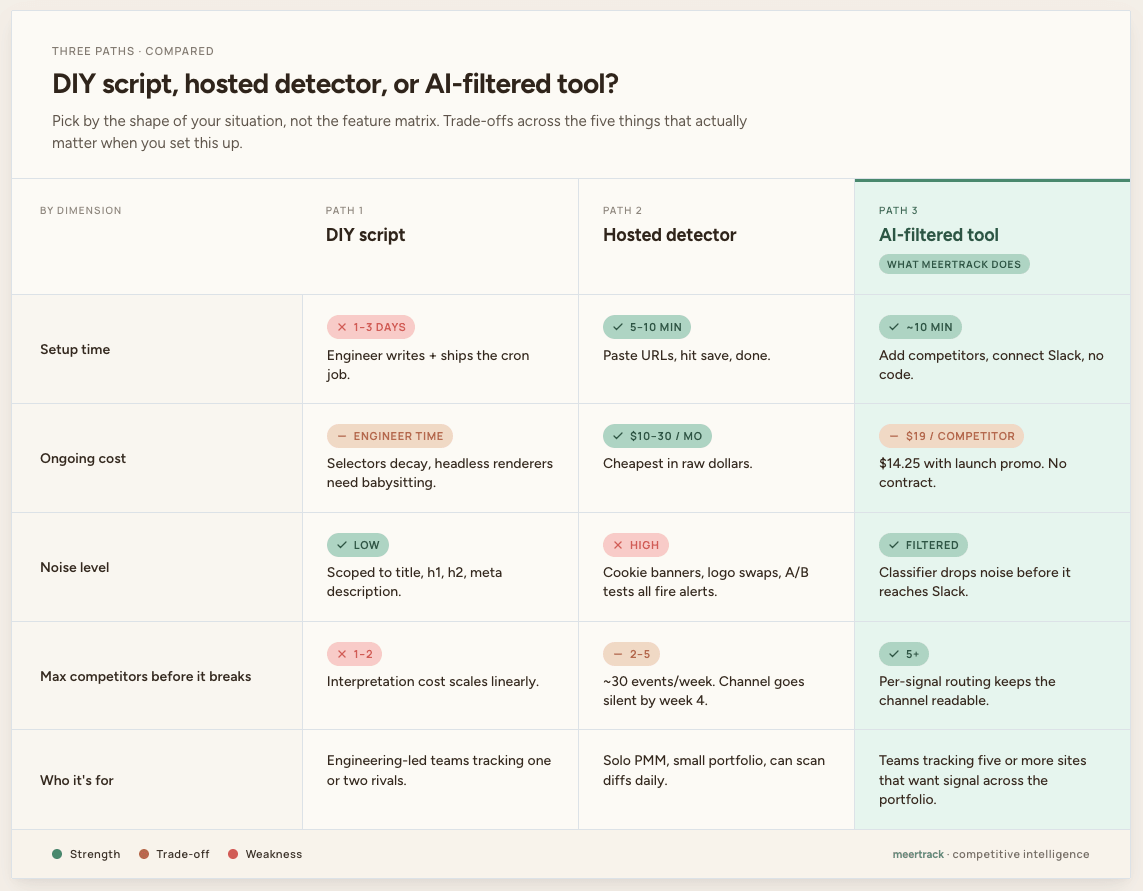
The math at five competitors and three pages each is roughly thirty change events a week. After two weeks, most teams mute the Slack channel; after a month, the email digest stops getting opened. The shape is the same every time: the tool runs, the team stops looking.
Path two trades the engineering bill for the attention bill. It works if you only care about one or two competitors and you can scan the diffs yourself in five minutes a day. It breaks down if you want to act on the signal across a portfolio, because the signal lives under a pile of design noise the tool cannot remove.
The hidden cost nobody prices in: alert fatigue
The most expensive feature in any competitive monitoring setup is the alert nobody reads.
Path one and path two fail the same way. The pipe runs, the channel fills, the team checks it religiously for two weeks, then stops. At that point the tool is running, the cost is sunk, and the work it was supposed to enable is not happening. Five competitors is the rough breakpoint we see in practice. Below it, manual triage holds; above it, attention runs out and the channel goes silent. We wrote about that failure pattern in more detail in Competitor Update Noise Is Doing More Harm Than Good.
Filtering is the product, not a feature you bolt on later. The reason fifteen-minute to hourly with classification beats minute-by-minute without is human, not technical. The channel you can read is the channel that does the work.
Path 3: An AI-filtered competitive intelligence tool (what Meertrack does)
An AI-filtered CI tool runs the crawl every fifteen minutes to an hour and classifies every change before it touches your Slack channel.
This is the path we built Meertrack for, and the path we use ourselves to track our own category. Meertrack crawls the competitor URLs you set up (homepage, pricing page, comparison pages, blog index, careers page) and captures the diff every fifteen minutes to an hour. Every diff runs through a classifier that labels it as messaging, pricing, product, hiring, or noise, then routes the labeled changes into per-signal-type Slack channels and email digests. The cookie banner ticking over does not reach you, while the hero copy rewrite does.
We are honest about latency. Detection-to-alert on a tracked competitor typically runs in the low hours: faster than any reasonable human cadence, slower than a bare cron job. We do not promise instant alerts, and the trade is intentional because the classifier needs enough context to decide.
Three things separate Path 3 from a hosted change detector with AI summaries bolted on:
- The classifier is the gate, not the garnish. Every diff is labeled before it reaches your channel. Noise labels are dropped, not summarized, and you never see them.
- Per-signal-type routing. Messaging, pricing, product, and hiring each land in their own channel. The PMM watches one, the CS lead watches another, the exec team gets the digest.
- Alerts cite the before-and-after copy verbatim. No summarized-away evidence. You see the exact words that changed, with the URL and the timestamp.
Where we are honest about Meertrack:
- Fifteen-minute to hourly cadence, not millisecond.
- AI does the filtering, not the writing. Alerts cite the before-and-after copy rather than summarizing the evidence away.
- Setup is roughly ten minutes for three competitors, no code required.
- Pricing is $19 per competitor per month (currently $14.25 with the launch promo). One plan, everything included, no contract.
- The trial is fourteen days, up to three competitors.
If five competitors is the rough breakpoint where the hosted-detector path stops working, the AI-filtered tier is the answer above that line. Below it, path one or two is genuinely enough.
Which path you should pick
Pick by the shape of your situation, not by the feature matrix.
If you track one or two competitors, have engineering hands, and competitive monitoring is one of two or three projects on the plate: path one is honestly fine. Write the script, ship it, accept that it will break, fix it when it does. The total cost of ownership at small scale is low.
If you track two to five sites, the team can tolerate some noise, and nobody is being paid to read Slack messages full-time: path two, a hosted change detector, is the right tradeoff. Pick by feature shape: open-source self-hosted, screenshot-diffing for individuals, selector-driven for power users, auth-supporting, or broadest-coverage. Each of the options above maps to one of those shapes.
If you track five or more sites, you have a Slack channel that someone is supposed to read, and you want the signal turned into action across the portfolio: path three, an AI-filtered tool. Meertrack is the one we built and use. There are other tools moving in this direction at the enterprise end of the market, priced an order of magnitude higher.
Most teams start on path one or two and graduate to path three when the noise stops being a feature and starts being the cost. The right time to switch is the week you realize you have not opened the change-detector channel in nine days.
FAQ
Is real-time competitor monitoring actually real-time?
It depends on the tier. Hosted detectors check as fast as every two minutes on paid plans, hourly on free plans, and daily on the cheapest plans. For messaging changes specifically, fifteen-minute to hourly cadence is enough, since messaging takes weeks to ship rather than minutes.
What pages should I monitor on a competitor's website?
The pages where messaging actually lives: the homepage, the pricing page, comparison or "vs" pages, the product or features page, and the careers page. The careers page is underrated; a sudden burst of hiring in a new function tells you what the company is about to build. Skip the blog index unless the company posts strategically. Skip the support docs entirely.
How often should I check competitor websites?
Fifteen minutes to one hour for the homepage, pricing page, and comparison pages. Daily is fine for everything else. Faster than fifteen minutes costs more money and catches nothing useful for messaging changes.
Can I get Slack alerts for competitor changes?
Yes. Every option in this post supports Slack delivery. A DIY script can hit a webhook; hosted detectors integrate natively; an AI-filtered tool routes by signal type into different channels so you don't drown one room.
Is monitoring competitor websites legal?
Reading publicly accessible web pages is legal in every jurisdiction we operate in. Some sites have terms of service that prohibit automated scraping; respect robots.txt and rate limits, and the legal risk is effectively zero. Authenticated pages, paid content, and private dashboards are a different category and not what any tool in this post is for.
How is an AI-filtered tool different from a hosted change detector with AI summaries?
A hosted detector with AI summaries still alerts on every change and then writes a summary of it. An AI-filtered tool drops the noise before it reaches you. The distinction is whether the classifier filters changes before they reach you or merely describes what already came through.
Try it on your stack
If five or more competitors is where you are, Meertrack runs a 14 day free trial that covers three of them and prices the rest at $19 per competitor per month. First alert is typically within twenty-four hours of setup. Setup takes just a few minutes, and we do not gate the trial behind a demo call. Start the trial at meertrack.com.
At one or two competitors, the script is honestly fine. When you grow past that, come back.
Reference: the DIY script
For engineers who want to ship Path 1 themselves:
# fetch -> extract title/description/h1/h2 -> diff -> alert
import httpx, json, pathlib
from bs4 import BeautifulSoup

URL = "https://competitor.example/"
state = pathlib.Path("state.json")
prev = json.loads(state.read_text()) if state.exists() else {}

html = httpx.get(URL, follow_redirects=True).text
soup = BeautifulSoup(html, "html.parser")
meta_desc = soup.find("meta", attrs={"name": "description"})

snapshot = {
    "title": (soup.title.string or "").strip() if soup.title else "",
    "description": (meta_desc.get("content") if meta_desc else "").strip(),
    "h1": [h.get_text(" ", strip=True) for h in soup.find_all("h1")],
    "h2": [h.get_text(" ", strip=True) for h in soup.find_all("h2")],
}

if prev.get(URL) and prev[URL] != snapshot:
    httpx.post(SLACK_WEBHOOK, json={"text": f"{URL} changed: {snapshot}"})

prev[URL] = snapshot
state.write_text(json.dumps(prev))